WhatsApp account banned? Why it happens and how to get your number back
Tanu Adhikari · Nov 16, 2026WhatsApp banned over 45 lakh Indian accounts in September 2026. Here’s how to appeal and get your number back.
Key takeaways
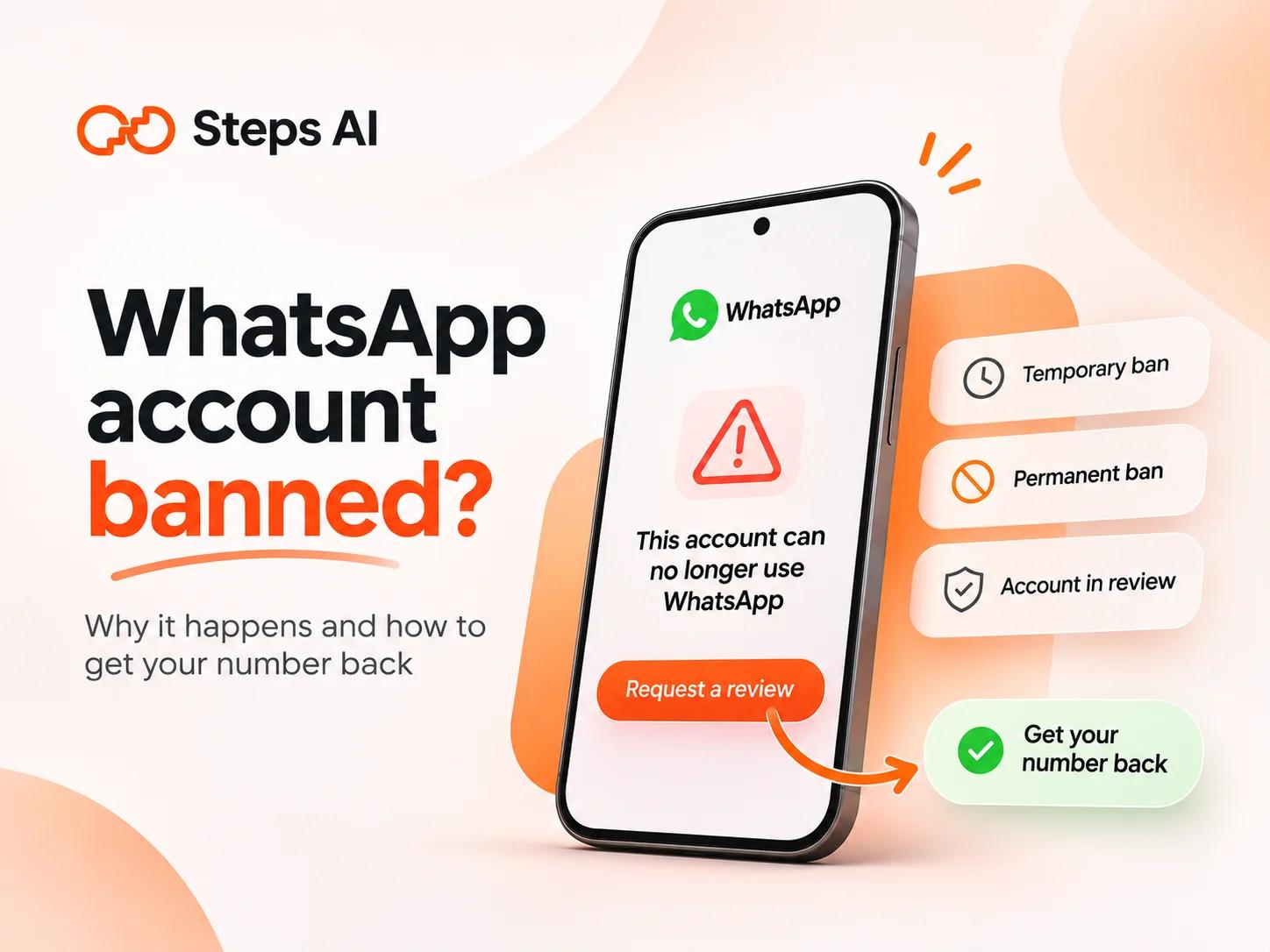
- Check your ban screen first. A countdown timer means a temporary ban, which lifts on its own when the timer ends. “This account can no longer use WhatsApp” means a permanent ban, which you can still appeal if you see a Request a review button.
- To get unbanned, open WhatsApp, tap Request a review, and send one short, honest explanation. Sending more than one request doesn't make the review go faster.
- If your business sends WhatsApp messages through a software platform (the WhatsApp Business API), you can’t appeal from the app. Instead, log in to Meta Business Suite and request a review from Business Support Home. Meta's decision typically takes 24 to 48 hours.
- The fastest way to get banned is an unofficial app or a bulk-sending extension. WhatsApp's Terms of Service prohibit bulk messaging, auto-messaging, and auto-dialing.
- Appeals rarely succeed after a real violation. In September 2026, WhatsApp acted on just 134 Indian accounts through ban appeals.
- If your business needs to message lots of customers, use the official WhatsApp Business API with opt-in. Steps AI connects your number through Meta's official sign-up and skips anyone who hasn't agreed to hear from you.
Finding your WhatsApp account banned is stressful, especially when your customers, orders and family chats all live on that one number. You're far from alone. In September 2026, WhatsApp banned 4,540,300 accounts linked to Indian phone numbers, and 1,293,500 of them were caught by its own systems before anyone complained. Earlier in the year, the number was even higher, with 81.79 lakh accounts banned in January 2026.
In this blog, we’ll show you how to tell whether you have a temporary or permanent ban, how to request a review, what to write, and how to keep your number safe from now on.
Temporary ban, permanent ban, or account in review: which one do you have?
WhatsApp shows a different screen for each kind of problem. Read yours carefully, because it decides your next step.
- Temporary ban: If you’ve been temporarily banned, you’ll see a countdown timer showing when you can use WhatsApp again. A temporary WhatsApp ban usually lasts 24 to 72 hours. WhatsApp says this could mean you’re using an unofficial version of WhatsApp or scraping contacts, which means collecting people’s phone numbers, profile photos, or status updates. Switch to the official app. If you don't, the account might be permanently banned.
- Permanent ban: The screen says "This account is not allowed to use WhatsApp." Many people see the wording "This account can no longer use WhatsApp" or "This account cannot use WhatsApp." On the Business app, it reads "This account can no longer use WhatsApp Business." You can't send or receive messages, but you can usually request a review.
- Account in review: This appears after you ask for a review, or when WhatsApp spots suspicious activity on your account by itself. The screen says your account activity and device info are being checked. Most reviews finish within 24 hours.
- Account restricted: This is the lightest penalty. A pop-up shows that your account is restricted because recent activity may indicate spam, automated, or bulk messaging. You can still reply to chats and WhatsApp groups you were already part of, but you can't start new conversations until the restriction lifts.
How to get your WhatsApp account unbanned
The only real way to recover a banned WhatsApp account is to ask WhatsApp to review it. Third-party services can't remove bans. Only WhatsApp can review and restore an account.
Where you ask depends on how you use WhatsApp.
On the WhatsApp or WhatsApp Business app
- Open WhatsApp on the phone with the banned number. Don't delete the app, because the ban screen is where your appeal starts.
- Tap "Request a review" under the ban message.
- Follow the on-screen steps. WhatsApp lets you add more information to support your review, so write a short note about how you use WhatsApp.
- Submit the request. Your screen will change to "Account in review."
- WhatsApp reviews your account and sends you a WhatsApp notification with the decision. Sending more requests won’t speed up the review process.
If your appeal works, you can bring your chats back from your backup when you log in again, as long as you’d made one earlier.
If you don't see a Request a review button, contact WhatsApp support through the contact page on WhatsApp's website. Enter your number in international format, with the country code.
On the WhatsApp Business API
If your business messaging runs on the WhatsApp Business API, through a platform or your own software, the app screen won’t help. Meta handles these appeals in Business Support Home.
To request a review:
- Sign in to Meta Business Suite.
- Click "All tools", then "Business Support Home".
- Click your WhatsApp Business account and pick the violation you want to appeal.
- Click "Request Review", enter supporting details, and click "Submit".
You can appeal any violation within 90 days of receiving it. If the appeal works, your account returns to its previous status.
WhatsApp unban request messages you can copy and paste
A good WhatsApp unban request message is short, polite, and true. Make sure it includes:
- Your full number, with the country code
- How you use WhatsApp
- What you’ve changed since the ban
If you did use a modified app or tool, admit it. Claiming you did nothing wrong when you did won't help.
Pick the template below that matches your situation, and replace the text in brackets with your own details.
If you think you were banned by mistake
Hello WhatsApp team. My number +[country code][number] was banned on [date]. I only use the official WhatsApp app to chat with [family and friends / customers who message me]. I don't use any modified apps, bulk senders or automation tools, so I believe this was a mistake. Please review my account and restore access. Thank you.
If you used an unofficial app or tool
Hello WhatsApp team. My number +[country code][number] was banned on [date]. I was using [GB WhatsApp / a browser extension] without realising it broke WhatsApp's terms. I've removed it and installed the official app from the [Play Store / App Store]. I won’t use third-party apps again, and I’ll follow WhatsApp’s guidelines from now on. Please review my account. Thank you.
If it's a business number
Hello WhatsApp team. [Business name] uses +[country code][number] to reply to customers about orders and support. The number was banned on [date]. We only message customers who contacted us first or agreed to hear from us at [checkout / sign-up]. [If true: We've stopped using (tool name) and will send bulk messages only through the official WhatsApp Business API.] Please review our account. Thank you.
Why WhatsApp bans accounts
WhatsApp bans accounts that break its Terms of Service, and it doesn't always wait for complaints. In September 2026, about 28% of bans on Indian accounts happened before any user reported them. Serious Terms of Service violations, like sharing harmful or illegal content or running scams, can get an account banned without warning. Most other bans come from one of four situations.
Using GB WhatsApp, FM WhatsApp and other modified apps
Modified apps like GB WhatsApp, FM WhatsApp, and WhatsApp Plus promise extra features, such as hiding your online status. These third-party versions aren’t approved by Meta, and WhatsApp can’t check their security practices. Using them can expose your data to risks and lead to a ban.
Uninstall the unofficial version and download the official app from the Play Store or App Store.
Sending bulk messages through extensions and third-party tools
This is the one that catches businesses. A Chrome extension or "bulk WhatsApp sender" promises to send your offer to thousands of numbers from WhatsApp Web. It feels harmless because it runs on your real account.
It still breaks the rules. WhatsApp's terms prohibit bulk messaging, auto-messaging, and auto-dialing. Since December 2019, WhatsApp has also said it will take legal action against people who do this or help others do it.
These tools look legitimate, so it’s easy to trust them, regardless of your experience. A friend of our founder, the CTO of a large company, used a third-party extension to send messages on WhatsApp. Meta blocked both his number and his business account. Nothing in the extension warned him about the risk, and that’s exactly the problem with these tools.
These tools can also put your data at risk:
- Researchers at Socket found 131 Chrome extensions that injected code into WhatsApp Web to send bulk messages and get around WhatsApp's anti-spam controls.
- Malwarebytes warned that such extensions can expose your messages and login data to third parties.
- In May 2026, researchers disclosed WaSteal, a network of 126 WhatsApp Web extensions with about 148,000 installs that quietly sent WhatsApp user data and ad cookies to outside servers.
One red flag to watch for: bulk-sender websites often warn you about getting banned and include FAQs on how to avoid detection. A tool that teaches you how to dodge WhatsApp's checks is telling you it breaks the rules.
Messaging people who didn't ask to hear from you
You don't need a tool to get banned. Sending spam messages, like the same promo to lots of unknown contacts, gets you blocked and reported. When multiple users report you in a short time, WhatsApp takes a closer look.
Reports also give WhatsApp evidence. When someone reports a message, WhatsApp gets a copy of your message and the four messages before it in your chat with them. That's how it can judge spam without reading everyone's chats.
Got banned without doing anything wrong?
It does happen. On August 3, 2026, WhatsApp placed many accounts in India and elsewhere under review for up to 24 hours, without warning. WhatsApp said it sometimes mistakenly bans accounts while trying to prevent abuse, and works to restore access quickly.
Two other innocent causes are worth checking:
- A recycled number: Phone companies reuse numbers, so the previous owner of your number may have used WhatsApp. If they broke the rules, a new SIM can come with a banned number. Mention this in your review.
- Someone else using your account: If a stranger gets into your account, they can send spam in your name. Check your linked devices and turn on two-step verification.
If you're sure you were wrongly banned, request a review and say exactly that.
What to do if your appeal is rejected
If WhatsApp upholds the ban, the decision is usually final. There's no secret WhatsApp permanent ban solution, but these steps help you move on safely:
- Don't pay anyone who promises to unban you. Only WhatsApp can review and restore an account.
- Fix the cause before you start again. Remove the app or tool that got you banned. If you repeat the same habits on a new number, it will likely be banned too.
- Get a new number, then re-register and log in to WhatsApp with it. Let your contacts know the new number.
- Expect to lose your old chat history. A backup only restores to the same phone number and the same Google or iCloud account that created it. So a backup from a banned number can't move to a new one.
How to avoid getting banned on WhatsApp again
WhatsApp asks everyone to use WhatsApp responsibly. In practice, these habits keep both personal and business numbers safe:
- Download WhatsApp only from the Play Store or App Store.
- Remove any extension or app that automates your WhatsApp. A third-party tool that asks you to scan your WhatsApp QR code to get access is a warning sign.
- Message people who saved your number or asked to hear from you.
- Don’t send the same message to lots of unknown contacts, especially from a new number. Sudden jumps in how many messages you send can trigger WhatsApp’s spam checks.
- Ask people before you create groups and add them.
- Don't share suspicious links or forward things you haven't checked.
- Turn on two-step verification, and back up your chats regularly.
What a WhatsApp ban costs a business
For a person, a ban is a headache. For a business, it can stop sales overnight.
- Every message on that number stops, not just marketing. Once your WhatsApp number is banned, the OTPs and order updates you send from it stop too.
- Customer chats disappear. Open conversations, pending orders, and contacts who only know you through that number are cut off.
- Ad spend is wasted. Click-to-WhatsApp ads keep sending people to a number that can't reply.
- Getting it back is a long shot. In September 2026, WhatsApp received 37,943 grievance reports from Indian users and acted on just 695 accounts, including 134 through ban appeals.
That's why avoiding a ban matters far more than knowing how to appeal one.
How to message customers at scale without getting banned
Most businesses that turn to a bulk sender do it because the free Business app stopped keeping up. WhatsApp broadcast lists hold up to 256 contacts, and only people who've saved your number receive your message. Replies also pile up on one phone.
Any business that wants to reach more customers safely needs four things:
- The official WhatsApp Business API, not an extension that drives WhatsApp Web.
- Opt-in, so you only message people who agreed to hear from you.
- Approved templates for messages you send first.
- A way to watch your number's health, so you slow down before Meta does it for you.
The API isn't a free pass, though. Meta warns businesses that break its policies first, then blocks them for 1 to 7 days. After that, the account is locked, and only an appeal can unlock it. Repeat offenders can be permanently disabled. It's safe when you follow the opt-in and template rules.
We built Steps AI around those needs, so the things that usually get numbers banned are taken care of:
- No extensions or workarounds. Steps AI connects your WhatsApp to the Business API through Meta’s own “Connect with Meta” sign-up.
- You keep what you have. Carry on using the WhatsApp Business app on your phone, with the same number.
- You won’t message people who didn’t ask. Campaigns automatically skip anyone who hasn’t agreed to WhatsApp marketing or who replied STOP. Those are the people most likely to report you.
- You won’t push past your limits. We remove duplicate numbers and slow your sending down when WhatsApp limits you.
- You’ll see trouble coming. Your quality rating and daily sending limit show live from Meta, so you can ease off before WhatsApp restricts you.
When customers reply, an AI agent trained on your business picks up the conversation:
- It answers their questions, day or night.
- It checks order status and tracks deliveries.
- It hands the chat to your team in one shared inbox when a person is needed.
The same dashboard also handles your Instagram DMs, your website chat, and phone calls, so you’re not juggling separate tools.
One of our customers came to us after a free automation extension got their number blocked. We helped them get the number back, and they now run their campaigns on that same number through Steps AI.
Steps AI can't unban a number. Only WhatsApp can do that. And if you chat with a handful of customers a day and never broadcast, the free WhatsApp Business app is all you need.
FAQs
Will reinstalling WhatsApp remove the ban?
No. The ban is on the phone number tied to your account, not the app, so reinstalling doesn’t lift it. You have to fix the cause and submit a review request through the ban screen. Deleting the app before you appeal can also make it harder to find the review option.
Can WhatsApp read my messages when it reviews my account?
No. Personal messages and calls are protected by end-to-end encryption, so not even WhatsApp can see them. WhatsApp makes decisions using limited information, such as basic account, group, and community profile details, plus messages other users report.
Can someone else unban my number for a fee?
No. Only WhatsApp can review and restore an account, and third-party services can't remove bans. Anyone selling an "unban service" is wasting your money, and giving them your number adds more risk.
Does WhatsApp warn you before banning your account?
Not always. A temporary ban or restriction often works as a warning, but some accounts are banned or put under review with no notice at all. On the WhatsApp Business API, Meta usually starts with a warning that names the policy you broke before it adds restrictions.