If you've ever tried to get a custom AI chatbot deployed on your website, you probably hit the same wall. A developer quote arrives, the timeline stretches to six weeks, and somewhere in the middle of it all, you realize the thing being built still won't actually connect to your live data. That's not a process problem. That's a structural one.
The good news is that no code AI agent platforms have genuinely changed what's possible for non-technical teams. Steps AI Agentic Chatbot was built specifically for this reality, so businesses can deploy intelligent, data-connected agents without needing an engineering team standing by.
This guide walks you through how to actually do it, what to watch out for at each stage, and where most deployments quietly fall apart before they ever go live.
Why Most "No Code" Chatbot Tools Still Need a Developer
Here's the thing that nobody puts in the product demo. A lot of tools marketed as no code are really low code in disguise. You get a drag-and-drop flow builder, sure. But the moment you want to connect your CRM, pull live inventory data, or hand off to a human agent, you're suddenly looking at API documentation and webhook configurations.
The gap between "setting up a chatbot" and "deploying an agent that actually helps users" is usually where the developer re-enters the room.
Real no code means you can connect your data sources, define your agent's behavior, and publish it, all from an interface designed for business operators, not engineers. That's a higher bar than most platforms clear. Before you commit to any tool, ask specifically whether live data integrations, escalation routing, and multi-channel deployment can all be configured without touching code. If the answer involves "our implementation team," it's not truly no code.
Understanding what makes a website chatbot effective comes down to this exact point. The architecture has to support real answers, not scripted fallbacks.
Step 1. Define What Your Agent Needs to Actually Do

This is where most deployments get skipped over too fast. Teams assume they know what the chatbot should do because the use case seems obvious. "It'll answer customer questions." Fine, but which questions? From what data source? What happens when it can't answer?
Vague briefs produce vague agents. Before you open any platform, write down the five most common questions your support team handles. Then write down the three things a user would be most frustrated not getting an answer to. That's your agent's minimum viable scope.
From there, map out escalation. What should the agent hand off to a human, and under what conditions? Does it need to capture a name and email before escalating? Does it route to different teams based on topic? These aren't technical decisions. They're operational ones, and getting them clear before you build saves you from painful rebuilds later.
This planning step is also where you decide what data the agent needs access to. A knowledge base of static FAQs is a starting point, not an endpoint. If your product pricing changes weekly or your inventory fluctuates, a static document isn't going to cut it.
Step 2. Choose a No Code AI Agent Platform With the Right Architecture
Not all no code platforms are built the same underneath. Some are essentially glorified FAQ bots with a GPT layer on top. Others are proper agentic systems that can reason across multiple data sources, take actions, and adapt responses based on context.
The distinction matters a lot in practice. An agent that can only answer questions from a pre-uploaded document will hit its ceiling fast. An agent built on an agentic architecture can pull from live data, remember context within a session, and take multi-step actions like booking an appointment or checking an order status.
When evaluating platforms, look for these specific capabilities:
- Native integrations with your existing tools (CRM, helpdesk, ecommerce platform)
- Session memory so the agent doesn't ask for the same information twice
- Escalation controls that let you define handoff logic without code
- Analytics that show where conversations break down, not just volume metrics
You can see a deeper breakdown of how these differ from standard chatbots in this AI agent vs chatbot comparison. The architectural difference is significant, and choosing the wrong category of tool is a common reason deployments underperform.
Steps AI Agentic Chatbot sits in the proper agentic category, which means it's built for live data access, multi-step reasoning, and business logic, not just scripted conversation trees.
Step 3. Connect Your Data Sources Before You Configure Anything Else

This is the step most guides skip entirely, and it's the reason so many deployed chatbots give outdated or incorrect answers. The agent is only as good as the data it can reach.
Start with your highest-confidence data sources. If you have a help center, a product documentation site, or a structured FAQ database, those are your foundation. Add them first, test responses from them, and establish that the agent is pulling accurately before layering in anything else.
Then move to dynamic sources. If you're connecting a CRM or an order management system, most serious no code AI agent platforms will offer a pre-built connector or a simple form-based integration that doesn't require API calls on your end. If the platform forces you into developer documentation at this stage, that's a red flag worth taking seriously.
One thing worth building in from the start is a data refresh schedule. Static uploads go stale. If your platform doesn't support automatic syncing, you'll need a manual process to keep the agent's knowledge current, and that process will get skipped. Why website chatbots fail often traces back to exactly this, stale data that quietly erodes trust over time.
Step 4. Configure Agent Behavior, Tone, and Escalation Logic

Once your data is connected, you're configuring how the agent behaves, not what it knows. This is where no code platforms genuinely shine if they're built well. You should be setting parameters in plain language, not writing prompts in a developer console.
Define the agent's persona. What tone does it use? Is it formal or casual? Does it use your brand's name? These settings should be adjustable through a simple editor, not buried in system prompt configuration.
Set hard limits on what the agent should and shouldn't answer. This is a step that protects you. If there are topics the agent shouldn't touch (legal advice, medical guidance, anything outside your product scope), configure those exclusions explicitly. A well-designed no code platform makes this a checkbox or a short text field, not a prompt engineering exercise.
Escalation logic is your last configuration priority before testing. Define the triggers clearly: sentiment detection, specific phrases, failed answers after a certain number of attempts, or explicit user requests for a human. Test each trigger manually. You want to know the handoff works before a real customer hits it.
Step 5. Test Adversarially, Then Publish
Most teams test their agent by asking it the questions it was designed to answer. That's not a real test. Adversarial testing means asking it questions it shouldn't answer, giving it incomplete information, and trying to break it on purpose.
Ask it something completely off-topic. Ask a question where the answer isn't in your data. Ask follow-up questions that depend on context from earlier in the conversation. If the agent hallucinating an answer or falling into a loop, you want to find that in testing, not in production.
Run the test with actual team members who weren't involved in building it. Fresh users will find gaps that builders overlook because they already know the "right" way to ask things.
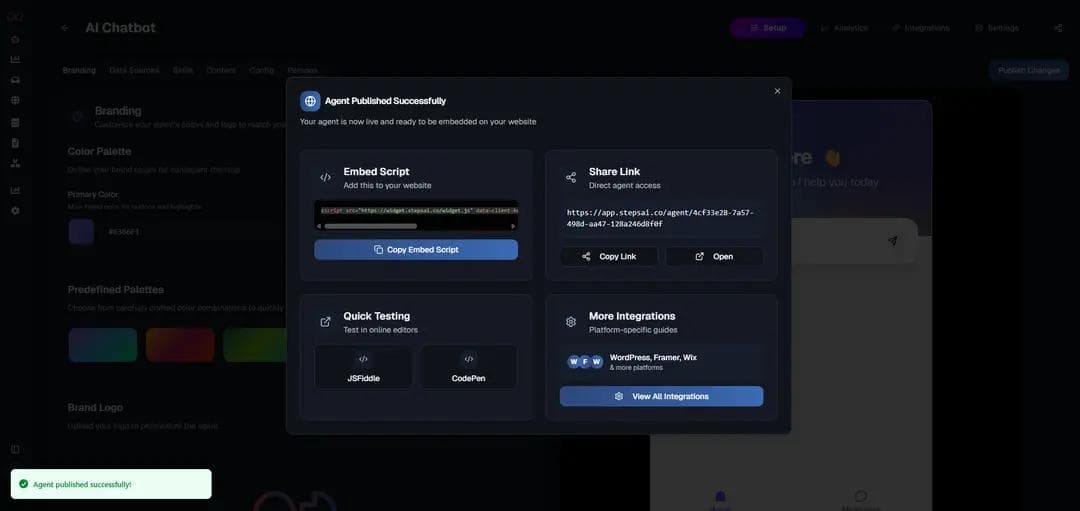
Once testing is clean, publish. Most no code platforms deploy via a simple embed code or a toggle that makes the agent live on your chosen channels. With Steps AI Chatbot, deployment can go to your website, a standalone link, or integrated channels without any additional configuration work.
This is also the moment to check that your conversational interface layer is working correctly from the user's perspective, not just the builder's. The experience the user has in the first ten seconds determines whether they trust the agent at all.
What to Evaluate, What to Avoid, and What Good Actually Looks Like
A well-deployed no code AI agent isn't a widget that sits on your site answering the same six questions. It's a live system that handles real volume, escalates cleanly, and gets better as you refine it over time.
The evaluation standard is simple: can a business operator update the agent's knowledge, adjust its behavior, and review its performance without filing a ticket to engineering? If the answer is no, you're not running a no code system. You're running a developer-dependent tool with a friendly interface on top.
Avoid platforms that lock your conversation data, make escalation a paid add-on, or require you to rebuild flows every time your product changes. Those decisions compound quickly into real operational debt.
What good looks like is an agent that handles the high-volume, low-complexity questions well, escalates the high-stakes ones cleanly, and gives your team visibility into exactly where the gaps are. Steps AI Agentic Chatbot is built to that standard, with a no code configuration layer that keeps business operators in control from day one.
Start Building Your No Code AI Agent Today
You don't need a developer to deploy an agent that works. You need the right platform and a clear operational brief.
Start building with Steps AI Agentic Chatbot
Frequently Asked Questions
What is a no code AI agent platform?
A no code AI agent platform lets you build, configure, and deploy an AI-powered agent without writing any code. You connect your data sources, define agent behavior, and publish through a visual interface designed for business operators rather than developers.
How is a no code AI agent different from a regular chatbot?
A standard chatbot follows pre-scripted decision trees. A no code AI agent can reason across multiple data sources, handle open-ended questions, take multi-step actions, and escalate intelligently based on context. The underlying architecture is fundamentally different.
Can a no code AI agent connect to live data?
Yes, if the platform is built for it. The best no code AI agent platforms support native integrations with CRMs, helpdesks, and ecommerce systems so the agent pulls current information rather than relying on static uploaded documents.
How long does it take to deploy a no code AI agent?
With a well-scoped brief and a properly built platform, a basic deployment can go live in a day or two. Complex integrations with multiple data sources and custom escalation logic may take a week. Either timeline is significantly faster than a custom-built solution.
What's the most common reason no code AI agents fail after launch?
Stale data. When the agent's knowledge base stops reflecting your current products, policies, or pricing, trust erodes fast. The fix is either automatic data syncing or a clearly owned manual refresh process, not a better prompt.