
Picture this: someone lands on your store, genuinely interested. They scroll, add to cart, then pause. "Wait, do they ship to my area? What’s the return policy?" They click around, can’t find a quick answer, get distracted by a notification, and close the tab.
You just lost a sale, and you’ll never even know why. Most ecommerce stores lose revenue not because of their products, but because of tiny moments of confusion that pile up into abandoned carts. Steps AI Chatbot fixes this by acting as a conversational layer that answers questions the second they happen.
Use Case 1: Answering Product Questions During Discovery
When someone first lands on your store, they aren’t ready to buy; they’re poking around, trying to see if you’re even a fit for their needs. They have basic, rapid-fire questions: "Do you have this in my size? Is this material waterproof? What's the warranty?" Usually, they find a wall of products or a buried FAQ page written years ago. This is exactly when a chatbot on your website hurts customer experience. It forces the user to do the heavy lifting.
Instead of making them hunt, a smart discovery bot acts like a floor assistant in a physical shop. A visitor can simply ask "got anything under $100?" and see relevant products immediately, or type "shipping to Canada?" and get the real answer instantly. They don't need a link to a 2,000-word policy page. Steps AI Chatbot is trained on your actual content, meaning it doesn't give robotic, generic answers; it pulls from your specific catalog so visitors stay on the page instead of bouncing.
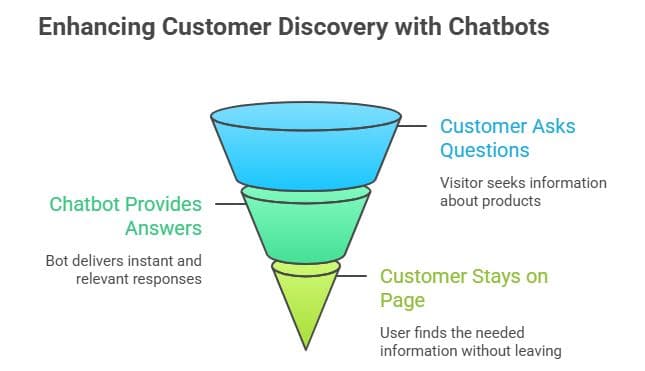
Use Case 2: Comparing Features and Real-Time Specs
Now the shopper is interested but hesitant. They’ve narrowed it down to two or three items, but they’re weighing the trade-offs: "Is the Pro version worth the extra $50? Is the blue one actually in stock right now?" This is the make-or-break moment. Most bots fail here because they aren't connected to live data. They give "I don't know" responses or, worse, confidently lie about inventory. This is a core reason why website chatbots fail.
When a bot can actually perform a spec comparison, like explaining the battery life difference between two laptops, it builds immense buyer confidence. Because Steps AI Chatbot acts as an intelligent conversational interface layer, it helps the customer decide now instead of "checking back later." We all know that is code for "never coming back."
Use Case 3: Removing Checkout Doubts
Checkout is where "almost" customers go to die. Every second spent hunting for a shipping estimate or a return policy is a second spent reconsidering the entire purchase. You are this close to a conversion, but a single doubt about a payment method or a delivery date can kill the momentum.
To save the sale, you need instant reassurance. If a customer asks, "Will this arrive by Friday?" they should get a real estimate based on your current logistics, not a link to a generic shipping table. You need to provide absolute payment clarity regarding PayPal, Apple Pay, or EMI options the moment they ask. The goal is zero redirection. Keep them on the checkout page at all costs. Steps AI Chatbot sits at the finish line to catch these doubts, proving that providing quick reassurance is what makes a website chatbot effective in driving actual revenue.
Use Case 4: Automating Post-Purchase Support
The journey doesn't end at "Place Order." Now comes the post-purchase anxiety: "Where is my tracking number? Wait, I ordered the wrong size, can I change it before it ships?" If your only answer is a contact form that says "We’ll respond in 48 hours," you’ve turned a happy buyer into a panicked customer who might never buy again.
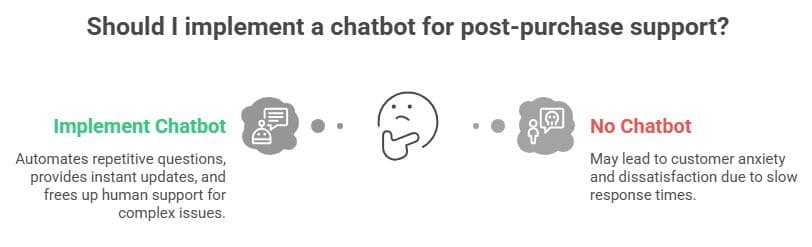
Smart post-purchase support handles the 80% of repetitive questions instantly. A customer asking "Where's my order?" should get an immediate status update for their specific order number. However, the bot must also know when to perform a smart handoff. It handles the easy stuff but brings in a human for complex issues like damaged goods. By reducing support tickets with chatbots, you free your team to handle real crises while keeping your customers calm, informed, and satisfied 24/7.
What to Evaluate Before Choosing a Chatbot
Before you add any widget to your store, you have to look past the flashy marketing demos. A tool that adds friction or gives outdated information is worse than having no tool at all. You need to ensure the system is built for continuous optimization so it stays updated as your products change.
- Real Data Training: Is the AI running on generic, hollow templates or is it actually ingesting your store data?
- Human Handoff: Does the bot trap people in frustrating loops or does it connect them to your team gracefully when needed?
- Context Awareness: Can the bot remember what the user was just looking at, or does it treat every question like a brand-new conversation?
The ultimate goal isn't to automate your business into a cold, robotic experience. It's to use Steps AI Chatbot to remove the tiny hurdles that stand between your product and a happy, returning customer.
Conclusion
Making sales isn’t just about good products. It’s about fixing the small moments that stop people from buying. When you use Steps AI Chatbot to answer product questions, compare features, and clear up checkout doubts, you stop losing customers who are just looking for a quick answer. By moving away from old FAQ pages and using an AI trained on your actual store info, you keep shoppers happy and guide them from their first click all the way to a finished purchase.
FAQs
What are the main ecommerce chatbot use cases?
The four main stages are: discovery (product questions), comparison (explaining differences), checkout (fixing last-minute doubts), and post-purchase (order tracking).
Can a chatbot really reduce cart abandonment?
Yes. By answering shipping or payment questions right on the checkout page, you stop people from leaving your site to find answers elsewhere.
How does a chatbot help after a sale?
It gives instant updates on order status and returns 24/7. This saves customers from waiting days for an email reply about their tracking number. See more on chatbots' impact on customer support.
Is it hard to train a chatbot on my products?
Not at all. Tools like Steps AI Chatbot read your website and product pages automatically, so you don’t have to type in every answer yourself.
Should I replace my support team with a chatbot?
No. The best way is to let the bot handle simple, repetitive questions while your human team focuses on more important or complex customer issues.