Support tickets keep piling up. Your team is answering the same questions over and over. You're hiring more support staff, but the workload just keeps growing. And you're wondering if there's a better way to handle this without burning out your team or compromising customer satisfaction.
The short answer is yes. An AI chatbot for websites can significantly reduce support tickets when implemented correctly. The difference between a chatbot that actually helps and one that just frustrates customers comes down to the technology behind it. Modern AI-powered solutions like Steps AI are specifically designed to handle the repetitive questions that flood your support inbox, while still providing the quality of help your customers expect.
This guide breaks down exactly how an AI chatbot for a website reduces support tickets, what makes it effective, and what you need to know before implementing one.
The Support Ticket Problem Most Businesses Face

Your support inbox is full of questions that fall into predictable categories. "What are your business hours?" "How do I reset my password?" "Do you ship internationally?" "What's your return policy?" These aren't complex issues. They're straightforward questions with straightforward answers.
But they still take time. Even if each ticket only takes three minutes, that adds up fast when you're getting hundreds per week. If you're getting 500 repetitive tickets per week, that's 25 hours of work. That's more than half of one full-time employee's week spent on questions that could be automated.
And it gets worse as your business grows. More customers mean more tickets. You can keep hiring, but that's expensive and doesn't scale efficiently. This is exactly the problem an AI chatbot for a website is designed to solve.
How AI Chatbots Reduce Tickets
The reduction happens through ticket deflection and resolution.
Ticket Deflection: Stopping Tickets Before They Start
A good AI chatbot for websites intercepts questions before they become tickets. When someone visits your website with a question, they see the chatbot and ask it directly instead of filling out a contact form or sending an email.
If the chatbot can answer their question satisfactorily, they never create a ticket. The interaction happens entirely within the chat interface. Problem solved, no ticket generated, no drain on your support team.
This works especially well for common, repetitive questions like pricing details, shipping information, return policies, account-related questions, and basic troubleshooting steps. These questions don't require human judgment. They just require accurate information delivered quickly.
The Numbers: What Kind of Reduction Can You Expect?
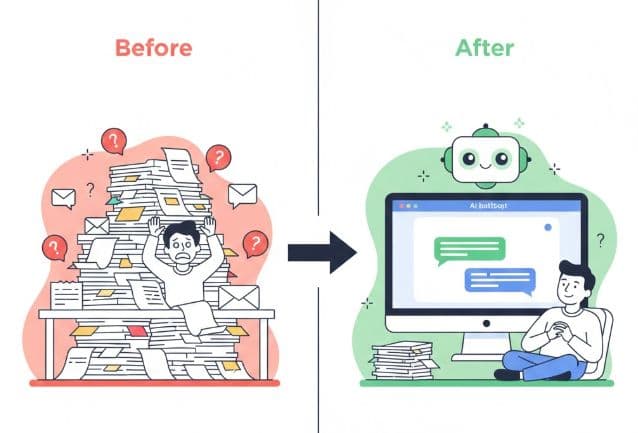
Businesses that implement a quality AI chatbot for websites typically see a 20-40% reduction in support tickets within the first three months. Some companies with highly repetitive question patterns see reductions as high as 60%.
Let's put that in concrete terms. If you're currently getting 500 support tickets per week, a 30% reduction means 150 fewer tickets per week. That's 7,800 tickets per year. At 3 minutes per ticket, that's 390 hours saved annually. That's nearly 10 full work weeks your team can redirect to higher-value activities.
Why Some Chatbots Fail to Reduce Tickets
Here's the catch: not every chatbot delivers these results. Read more about how Some chatbots actually hurt your customer experience instead of helping it.
The chatbots that fail to reduce tickets share common problems. They don't understand natural language, so customers have to phrase questions in specific ways or click through button menus. They give wrong or outdated information, destroying trust. They can't handle follow-up questions because they treat every message as standalone. They're poorly trained with incomplete information. And they make it hard to reach a human when needed.
This is why the type of chatbot you choose matters. Traditional chatbots that rely on scripted flows and button menus struggle with these issues. Modern AI-powered solutions are specifically designed to avoid them.
What Makes an AI Chatbot Effective at Reducing Tickets
Not all AI chatbot for website solutions are created equal. The ones that actually deliver ticket reduction share specific characteristics.
Natural Language Understanding: The chatbot needs to understand how real people actually ask questions. When someone asks "Can I return this if it doesn't fit?", "What's your return policy?", and "Do you accept returns?", an effective AI chatbot recognizes these are all asking about the same thing.
Comprehensive Knowledge Base: Your chatbot should have access to all the information customers typically need. This includes complete product documentation, current pricing, all policies, common troubleshooting steps, and integration information. The more comprehensive your knowledge base, the more questions the chatbot can handle independently.
Contextual Awareness: Good AI chatbots remember what was said earlier in the conversation. If someone asks about a product and then asks "Does it come in blue?", the bot knows "it" refers to the product just discussed. This conversational continuity makes interactions feel natural.
Accurate and Up-to-Date Responses: The information your chatbot provides must be correct and current. Platforms like Steps AI make this easy by letting you simply upload updated content rather than manually reprogramming responses.
Graceful Human Handoff: Your ai chatbot for website should recognize when it's reached its limits. When it can't answer a question with confidence, it should smoothly transfer to a human rather than giving vague or potentially incorrect information.
Real-World Example: How It Works
Let's walk through a typical scenario. A customer visits your e-commerce website at 10 PM on a Sunday with questions. Without a chatbot, she'd either leave without buying or submit a contact form and wait until Monday for a response.
But you have an effective AI chatbot for websites. The customer asks "Do you ship to Australia?" The chatbot provides shipping options and costs. She follows up with "What about customs fees?" The bot explains the policy. She asks about returns, and gets an immediate answer.
In this interaction, the chatbot answered three separate questions that would have each potentially been support tickets. The customer got immediate answers, made an informed purchase decision, and your support team never had to get involved. Multiply this by hundreds of similar interactions per week, and you see how the ticket reduction compounds.
Beyond Ticket Reduction: Additional Benefits
While reducing tickets is the primary goal, an effective AI chatbot for websites delivers several other valuable benefits.
24/7 Availability: Support tickets don't only come during business hours. An ai chatbot for website provides instant help during off-hours without requiring you to staff overnight shifts. This is especially valuable for businesses with international customers across multiple time zones.
Faster Response Times for Everyone: When your chatbot handles routine questions, your human team has more bandwidth for complex issues. This means faster response times across the board, even for questions that do require human attention.
Consistent Answer Quality: A well-maintained chatbot provides consistent, accurate answers every single time. There's no variation based on who happens to pick up the ticket.
Valuable Data and Insights: Your chatbot interactions generate data about what customers ask most often, which information is hardest to find, and where your documentation might have gaps. This insight helps you improve your entire support operation.
Implementation: What You Need to Know
If you're ready to reduce your ticket volume, here's what successful implementation looks like.
Start with your most common questions. Audit your recent support tickets. What questions come up repeatedly? These are your highest-priority items to address with your chatbot. Common categories usually include product specifications, pricing, shipping, returns, account management, and technical requirements.
Provide complete, current information. Your chatbot can only work with the information you give it. With platforms like Steps AI, this process is straightforward. You simply upload your existing content and the AI learns from it. No need to manually program every possible conversation path.
Monitor and improve continuously. Track your chatbot's performance. Look at which questions it handles successfully and which ones lead to escalation. Set a regular schedule to update your chatbot's knowledge base with new information or policy changes.
Ready to reduce your support ticket burden? Try Steps AI free and see how quickly you can deflect routine questions, free up your team's time, and improve your customer experience. Set up takes minutes, not weeks, and no coding is required.
The Bottom Line
Can an AI chatbot for websites reduce support tickets? Absolutely. A well-designed, properly maintained AI chatbot can reduce your support ticket volume by 20-40% or more. This translates to hundreds of hours saved, thousands of dollars in reduced costs, and significantly improved customer satisfaction.
The key is choosing a solution that actually understands natural language, maintains conversational context, and provides accurate information consistently. Traditional button-based chatbots won't deliver these results. You need modern AI technology that can handle real conversations.
Try Steps AI for free and watch your support ticket volume drop while your customer satisfaction rises.
Frequently Asked Questions (FAQs)
How much can an AI chatbot realistically reduce support tickets?
Most businesses see a 20-40% reduction in support tickets within the first three months. Companies with highly repetitive question patterns can see reductions up to 60%. The exact number depends on your business type and how well your chatbot is set up.
What types of support tickets can an AI chatbot handle?
AI chatbots excel at handling routine, repetitive questions that don't require human judgment. This includes questions about pricing, features, policies, shipping, returns, account management, and basic troubleshooting. Complex issues requiring investigation or creative problem-solving should still go to human support.
How long does it take to see ticket reduction results?
You can see initial results within the first week as the chatbot starts handling common questions. More significant reduction typically becomes apparent within 30-60 days as you optimize its performance based on early data.
How much technical knowledge do I need to set up an AI chatbot?
With modern platforms like Steps AI, you need zero technical knowledge. You simply upload your business information, customize the appearance, and add a code snippet to your website. The entire setup takes minutes and doesn't require developers.
What happens when the chatbot can't answer a question?
A good AI chatbot for a website should recognize when it doesn't have enough information to help. In these cases, it should offer to connect the customer with your human team and pass along the conversation context so your team can pick up seamlessly.